
How to Make the Hit the Road Dude AI Video: the “Private Property” Meme From One Photo
How to make the Hit the Road Dude AI video from one photo: why the driver is a cat, the steps, standard vs extended, photo tips and price.
By Hit the Road Dude AI · Published · Updated · 4 min read
The meme in 30 seconds
The meme starts from a clip of an older man in a white pickup who rolls up on a fisherman at a pond. The lines everyone quotes go roughly like this:
- “Who told you to fish here?”
- “I thought it was state property.”
- “State? Hit the road, dude. This ain’t state property, it’s private property.”
- “What’s your name? I want your name.”
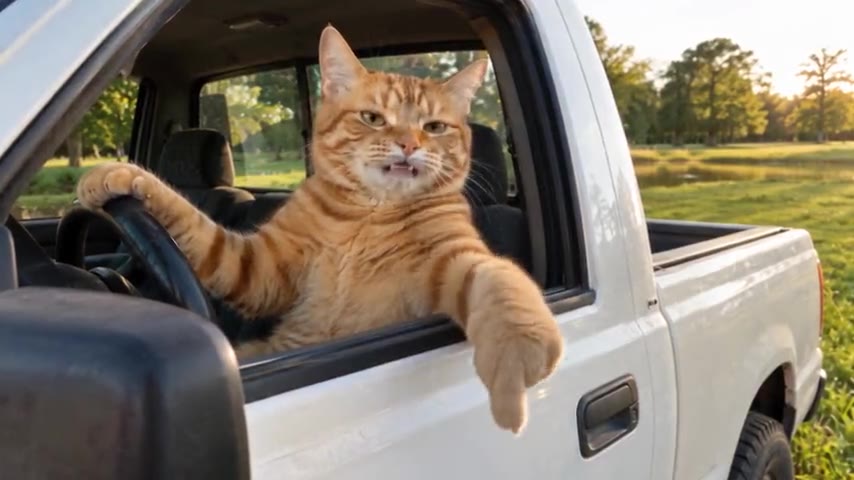
The lines became a TikTok sound, a GIF and a sticker. In fall 2026 AI remakes took over, and the one that stuck recast the driver as an orange tabby cat: one paw on the wheel, the other hanging out of the window, deadpan as ever. That is why the trend goes by two names, “hit the road dude AI” and “this is private property AI”, and why the AI version you see most is a cat. For the whole timeline, from the 2025 clip to the pet remakes, read how the AI trend started and spread.
How to make the Hit the Road Dude AI video, step by step
This hit the road dude AI tutorial takes four steps: pick a photo, upload it, choose the length, format and quality, then generate and download. Rendering takes a few minutes, and no prompt or editing is needed.
Step 1: Pick one photo
Decide who replaces the cat in the driver’s seat: you, a friend who said yes, your own cat or dog, or a character you drew. One face, front-facing, head and shoulders in frame.
Step 2: Upload it in the generator
Open the Hit the Road Dude AI generator and drop the photo into the box. A still of the cat sits next to it, so you can see who you are replacing.
Step 3: Pick the length, format and quality
Standard (15 s) or Extended (30 s); landscape 16:9 or portrait 9:16 for a phone screen; then Standard 480p for 100 credits, HD 720p for 200 or Full HD 1080p for 300. The extended video costs twice as much.
Step 4: Generate
The pickup, the pond, the lines and the timing are already loaded in the template, so there is no prompt to write. Rendering takes a few minutes and you can leave the page meanwhile; the video waits in the studio.
Step 5: Download and post
Save the video and post it to TikTok, Reels or Shorts. If a platform mutes the audio, add the “hit the road dude” sound inside the app before posting; the sound guide shows how, and the TikTok and CapCut guide covers captions and hashtags.
Standard or extended?
- Standard, 15 s: the driver at the window delivering the lines. The classic meme, and the cheapest, from 100 credits.
- Extended, 30 s: opens on the pickup parked by the field and a walk down to the pond, then the full confrontation, and ends with the driver writing the fisherman’s name on a notepad. From 200 credits.
Photo tips for a better Hit the Road Dude video
- One person or pet per photo. Group shots confuse the model.
- Face the camera, face clearly visible, even light.
- No sunglasses, masks or heavy filters.
- The driver wears the outfit from your photo, so pick the look you want in the truck.
- Only people who agreed to appear. No celebrities, and no photos of the man in the original clip.
Hit the Road Dude AI with your cat or dog
The trend made a cat the landowner, so pets are a natural fit. Use a sharp photo with the eyes and the whole face visible, not mid-blink or mid-shake. Your pet keeps its own fur and markings and takes over everything the orange cat did: the paw on the wheel, the lean out of the window and the “hit the road, dude”.
Captions that fit the meme
Most posts caption the beats on screen. Three that follow the audio: “STATE?”, then “HIT THE ROAD DUDE”, then “THIS IS PRIVATE PROPERTY”. On the extended video, end on the notepad with something like “your name is on the list”.
Free, app or filter?
- Free: not on this site. A video costs from 100 credits and packs start at $9.90, one-time, no subscription. Failed videos are refunded automatically. The free options guide lists the ways to make the meme for $0.
- App: nothing to install. It runs in the browser on any phone or computer.
- Filter: it is not a camera filter. The AI recreates the clip with your photo as the driver, so you never film anything.
- Prompt: none needed here. If you want your own setting or lines in a general AI video app, copy a Hit the Road Dude AI prompt.
New to the meme? Read what “hit the road, dude” means and where it came from. Making one with your pet? The cat and dog guide has pet photo tips.